Payments and billing
WebTwizz has a free Starter plan and two paid plans, Standard and Pro. Each paid plan comes in a few sizes, depending on how many credits you want each month.
Your plan lives in account Settings under Subscription, and your credits under Usage. To get there, click your name at the bottom of the dashboard sidebar, then Settings. On the free plan, the Upgrade card in the dashboard sidebar opens Subscription directly.
Plans
Starter (free)
- 100 credits when you sign up. They never expire.
- 10 free credits a day, up to 50 a month
- 1 published site
Standard
| Credits per month | Monthly | Annual |
|---|---|---|
| 1,500 | $25/mo | $21/mo ($252 a year) |
| 3,000 | $40/mo | $33/mo ($396 a year) |
Standard includes:
- Access to the code editor
- Export your code
- Custom AI instructions
- AI image generation
- A custom domain
- Private sites, with people invited by email
- Removing the WebTwizz badge
- Up to 5 published websites
Pro
| Credits per month | Monthly | Annual |
|---|---|---|
| 4,500 | $50/mo | $42/mo ($504 a year) |
| 6,000 | $70/mo | $58/mo ($696 a year) |
| 9,000 | $100/mo | $83/mo ($996 a year) |
Pro includes everything in Standard, plus:
- Up to 15 published websites
- Priority support
Annual billing saves about 16%. Paid plans also get the 10 free credits a day.
How credits work
Credits pay for the AI's work: chat messages, generated images and web searches. A bigger task uses more credits than a small one.
- Max mode does deeper work and uses more credits than Normal.
- A message needs a small balance to start: 25 credits in Max, 5 in Normal and 2 in Chat.
Credits are spent in this order: today's free credits first, then your plan credits, then credits you bought or were given.
- Free daily credits don't build up. Each day's credits replace the day before.
- Plan credits reset when your plan renews. Unused plan credits don't carry over.
- Credits you buy, and bonus credits like the Starter sign-up credits, never expire.
Usage
Settings > Usage shows what you have and what you've used.
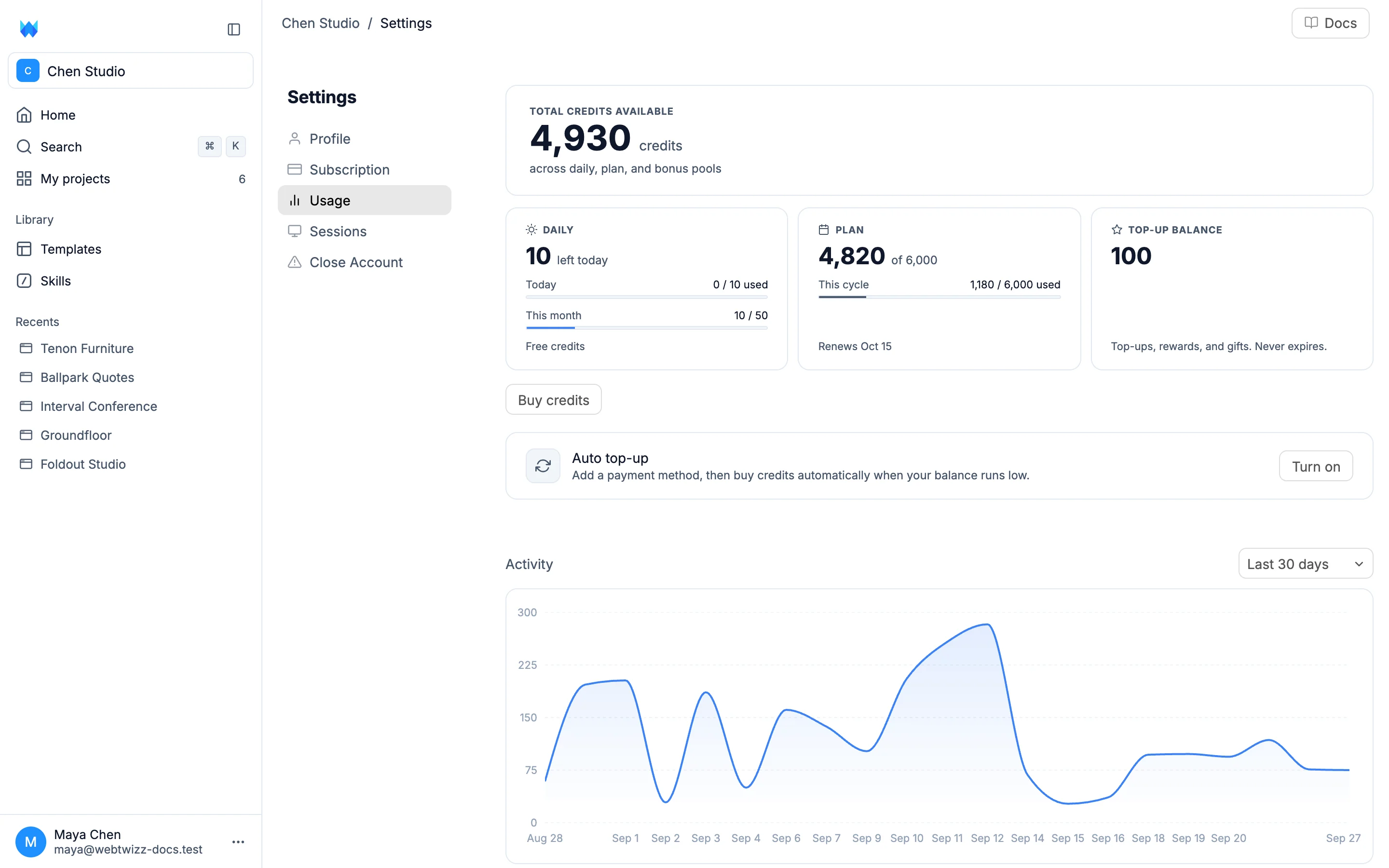
- Total credits available: everything you can spend right now.
- Daily: free credits left today, and how many of this month's free credits you've received.
- Plan: your plan credits left this cycle and when they renew. On the free plan this card reads Free.
- Top-up balance on paid plans, or Bonus on the free plan: credits that never expire.
Under Activity, pick Last 7 days, Last 30 days or Last year to see a chart of your usage, with Total credits, Messages and Images generated below it.
On the free plan, you may see Want free credits? under the cards. Click it to see how to earn 150 credits once by posting about WebTwizz.
Buying extra credits
Paid PlanIn Usage, click Buy credits. Enter an amount in credits or in USD, between 100 and 10,000 credits. Credits cost $10 per 1,500. Click the Purchase button, which shows the total, and pay on the checkout page. It's a one-time charge, and the credits land in your Top-up balance.
Auto top-up
Paid PlanAuto top-up buys credits for you when your balance runs low, so a build never stops halfway. In Usage, click the Auto top-up row and set:
- Add each time: how many credits to buy.
- When balance drops below: the total balance that triggers a top-up.
- Monthly limit: the most it can spend in a calendar month.
You need a card on file. If you don't have one, click Add payment method first. Then click Turn on.
The row shows On while it's running. It shows Limit reached when the next top-up would pass your monthly limit, and Paused when a payment didn't go through. Click Fix on a paused row to see what to do. To stop it, open the row and click Turn off.
Changing your plan
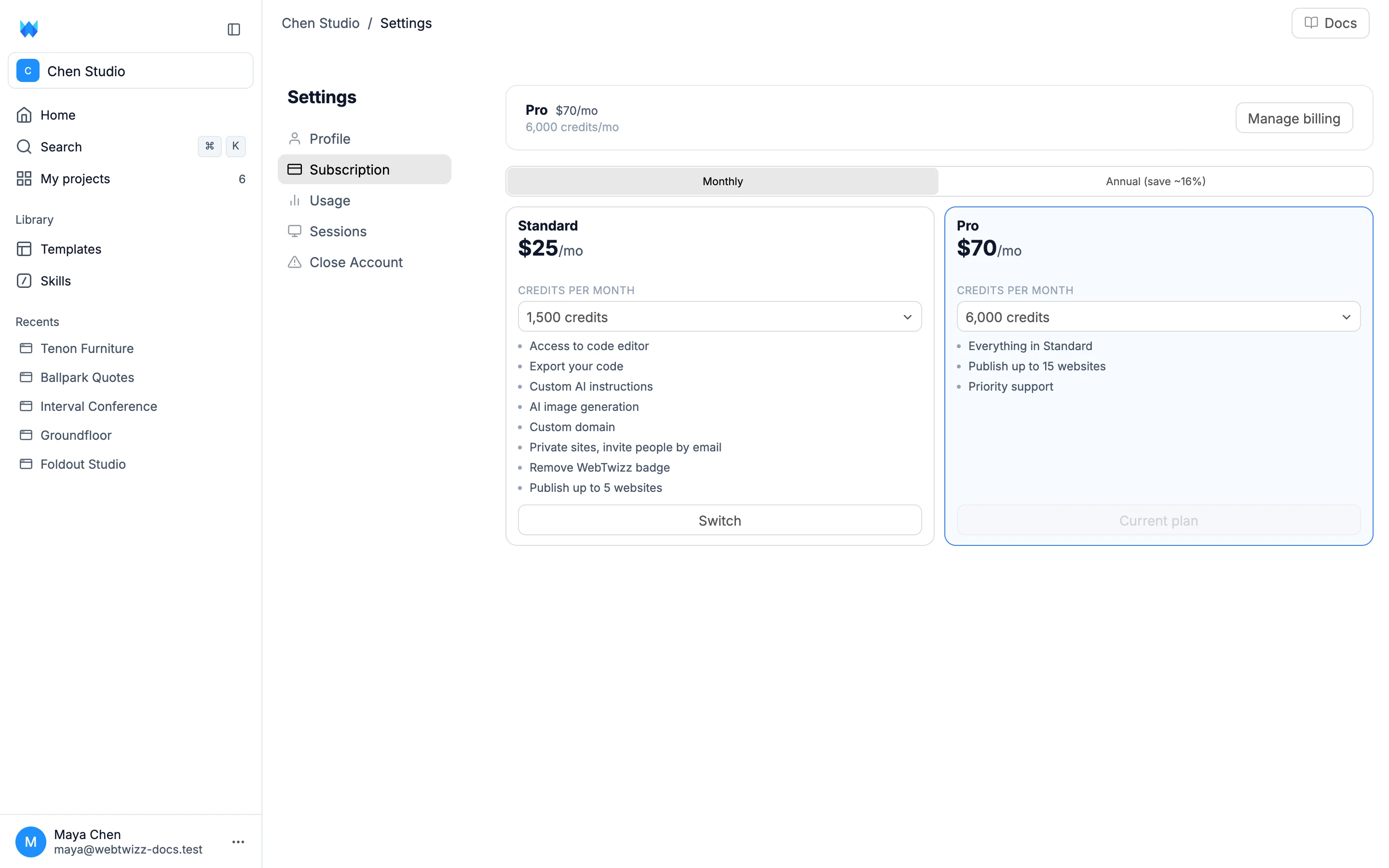
The top of Subscription shows your plan, its price, your monthly credits and when they reset. Below it, switch between Monthly and Annual (save ~16%), pick a size under Credits per month on the Standard or Pro card, and click its button:
- On the free plan, the button opens checkout.
- Upgrade moves you to a bigger plan right away. Your new credits are available immediately, and the price difference is prorated.
- Switch moves you to a smaller plan. The change takes effect at your next billing cycle.
- Switch to annual moves your current plan to annual billing. An annual plan can't be switched back to monthly.
Paid plans confirm the change in a small window first.
Managing billing and canceling
Click Manage billing to open the billing portal. There you can change your card and cancel your plan.
When you cancel, your plan stays active until the end of the billing period. The Subscription tab shows Plan cancels with the date. If you have more published sites than the free plan allows, it also says how many will be unpublished and when, and which site stays live.
After your plan ends, you have 14 days before your account moves to the free plan, and WebTwizz emails you before that happens. Then your most recently published site stays live and your other published sites are unpublished. Pick a plan again within those 14 days and nothing is unpublished. Auto top-up turns off when your plan ends.
If a payment fails
If your plan doesn't renew, for example because your card was declined, a strip at the top of the dashboard and the builder says Your plan didn't renew. New plan credits are paused until the payment goes through. Click the strip to pay.